Telve (TEL-veh)

A round controller for your Linea Micra.

The rich layer of grounds left in a Turkish coffee cup, and some say it holds your fortune.

Set temperature, steam and pre-brew with a turn and a press, time and weigh every shot from the moment the paddle moves, and get a suggestion for the next one. Try it here: the device on this page runs the same screens as the real thing.

Try it · drag the ring, press, swipe

Drag the ring to turn; or click the device and use ← → and Enter. Hold Press knob (or Enter) to go back to the first screen. Swipe the screen sideways to change screens, down for settings, or up for the brew settings once a scale is on. On a shot's result, tap to rate it and hold to close. Heat-up is sped up to 25 seconds here.

What it does

Screens from a real Telve on a Linea Micra, taken over Wi-Fi.

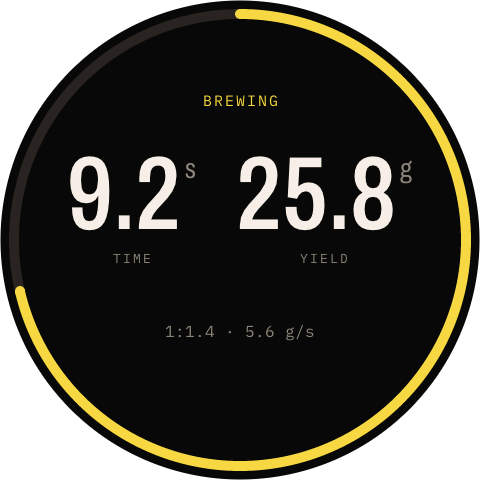
Telve brewing: 9.2 seconds, 25.8 grams, ratio 1:1.4 at 5.6 grams a second, the ring three-quarters full

The shot

Times and weighs every shot, from the first second

  • Lift the paddle and the whole screen becomes the shot: your Micra tells Telve over Bluetooth, three to four seconds before the cloud would.
  • With a Bookoo scale it tares as the shot starts and shows yield, ratio and flow as you pull.
  • The ring fills toward your target yield and turns green there; without a scale it marks the 25–30 s window, moved later for your pre-brew.
  • The final time is the machine's own, and short pulls count as flushes, not shots.
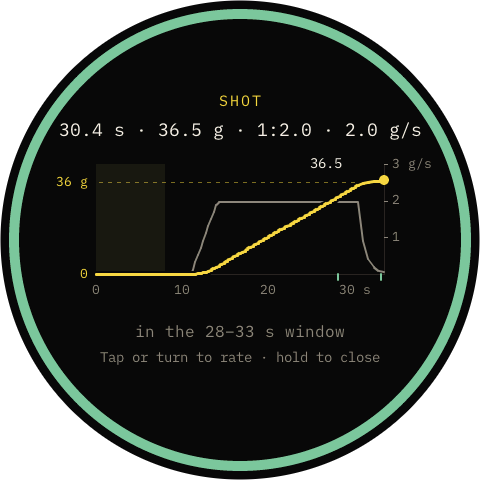
The shot's result: 30.4 seconds, 36.5 grams, 1:2.0, 2.0 grams a second, in the 28 to 33 second window; the weight curve rises to the 36 gram target line, with pre-brew shaded and the flow drawn on its own scale at the right, up to 3 grams a second

The graph

See the shot you just pulled

  • Weight over time against your target line, with the flow on its own scale at the right.
  • Pre-brew is shaded, so you can see where the shot proper starts.
  • The result waits two minutes for you. Hold the screen to close it; a tap won't do it by accident.
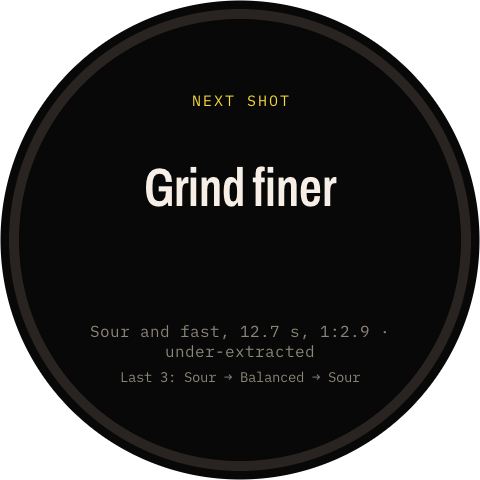
Next shot advice: Grind finer. Sour and fast, 12.7 seconds, 1:2.9, under-extracted. Last 3: Sour, Balanced, Sour

Dial-in

One change for the next shot

  • Tap the result and rate it sour, balanced or bitter.
  • Telve weighs the taste against the time and, with a scale, the ratio, then suggests one thing: grind, yield, temperature or puck prep.
  • Pre-brew is taken into account, from your machine's own setting: with 3 + 5 s of pre-brew the window becomes 28–33 s, and half a second either side still counts.
  • It remembers your last shots, so you can see whether the change worked.
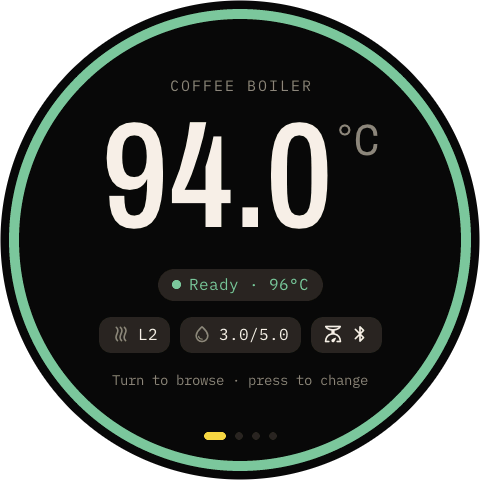
The coffee boiler screen: 94.0 °C, Ready at 96 °C, steam level 2, pre-brew 3.0/5.0, and the scale badge

The machine

Turn, press, done

  • Coffee temperature in 0.1 °C steps, steam level, pre-brew times, and power.
  • Nothing changes until you press, and “Saving…” stays up until your Micra confirms.
  • The live boiler temperature and the machine's state, always in the same place: ready, heating, refill the tank, offline.
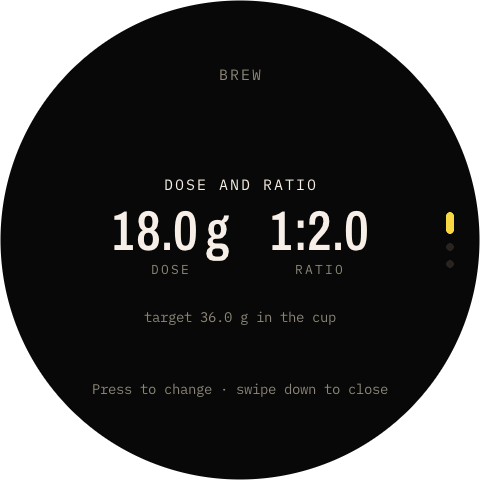
Brew settings: dose 18.0 grams, ratio 1:2.0, target 36.0 grams in the cup

The scale

Your dose and ratio, a swipe away

  • Swipe up for the brew settings: dose and target ratio, auto-tare, and which shot screen to show.
  • The Bookoo's auto-off and beep are set from Telve too, so you never need its app.
  • Telve pairs with the scale once and reconnects whenever you wake it up.
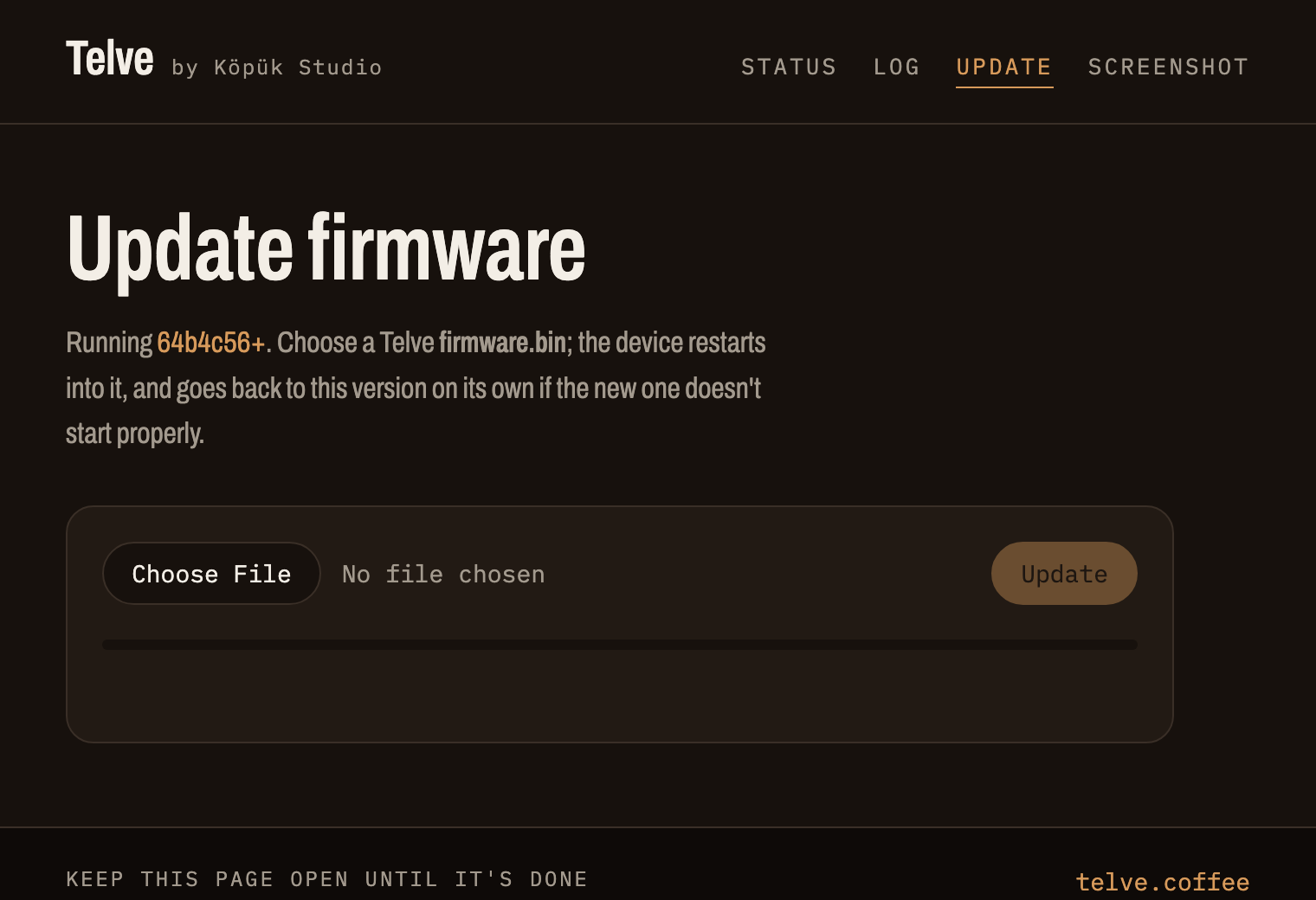
Telve's firmware update page in a browser

Your network

Open telve.local

  • A status page with Wi-Fi, Bluetooth, cloud and scale health, and a live log.
  • Your last 30 rated shots as a table, to download as a spreadsheet.
  • New firmware installs from the browser. A new version runs on trial, and if it doesn't start properly Telve goes back to the previous one by itself.

Everything it does

Machine

  • Coffee temperature, 0.1 °C steps
  • Steam on, off and level
  • Pre-brew on and pause times
  • Power and standby
  • Changes confirmed by the machine
  • Boiler temperatures over Bluetooth
  • Water tank warning
  • Stays in sync with the La Marzocco app

Shot

  • Instant start over Bluetooth
  • The machine's own final time
  • 25–30 s window, moved for pre-brew
  • Flushes told apart from shots
  • Shot graph with flow and pre-brew
  • Hold to close, tap to rate
  • Next-shot advice
  • Recent ratings remembered

Scale

  • Bookoo Mini, paired once
  • Auto-tare as the shot starts
  • Live yield, ratio and flow
  • Ring that fills to your target
  • Dose and ratio settings
  • Three shot layouts, or Auto
  • Scale auto-off and beep
  • Scale battery in Settings

Display

  • Accent follows your Micra's colour
  • Brightness
  • Dims after a while, to a level you pick
  • Screen off when idle
  • Knob and touch
  • Connection health in words

Network

  • Status page and JSON at telve.local
  • Shot history as CSV
  • Live log
  • Updates over Wi-Fi
  • Automatic rollback
  • Crash reports
  • Screenshots of the screen

Works with

MachineStatusNotes
Linea MicraTestedEverything on this page
Linea Mini / Mini RPlannedLooking for a tester
GS3 AV / MPPlannedSteam is set by temperature on the GS3
Bookoo Mini scaleTestedOptional: weight, ratio and flow on the shot screen

You need a La Marzocco account with your machine paired in the La Marzocco app (an email and password login; Apple or Google sign-in alone won't work), and 2.4 GHz Wi-Fi. The Bluetooth shot timer and boiler temperatures need machine firmware with La Marzocco's shot counter; Telve checks, and otherwise times shots through the cloud, a few seconds behind.

Setup

  1. Plug it inAny USB-C power. Telve starts and shows a QR code.
  2. Scan the codeYour phone joins Telve's own Wi-Fi and opens the setup page.
  3. Add your detailsYour home Wi-Fi and your La Marzocco login. They stay on the device.
  4. BrewTelve finds your machine and shows it within a few seconds.

On-device setup and a firmware installer that runs in your browser are being finished for the first batch.

Questions

Does it need the internet?

To change settings, yes: Telve sends them through La Marzocco's cloud, the same way the app does. Shots and boiler temperatures come straight from your machine over Bluetooth, so the timer keeps working when the internet drops out. Sending settings over Bluetooth too is planned.

Why Bluetooth and the cloud?

Bluetooth is instant: the machine reports a shot the moment the paddle moves, three to four seconds before the cloud does, along with its boiler temperatures. The cloud covers everything else, and takes over if Bluetooth drops.

Do I need a scale?

No. Telve times every shot and suggests the next change without one. With a Bookoo Mini it also shows the yield, ratio and flow, tares the scale for you when the shot starts, and the advice takes the ratio into account. Dose and target ratio are in the brew settings (swipe up).

Which scales work?

The Bookoo Mini, which publishes its Bluetooth protocol. Telve pairs with the first one it sees, remembers it, and reconnects whenever it wakes up. The scale takes one connection at a time, so close the Bookoo app while Telve is using it.

Does the shot time include pre-brew?

Yes: like the machine itself, Telve times from the moment you lift the paddle. Pre-brew soaks the puck, which the pump would otherwise do in the first few seconds of a shot, so Telve moves the 25–30 s window later by your pre-brew less those 5 s: 3 + 5 s of pre-brew makes it 28–33 s. It reads the times set on your machine, so changing pre-brew doesn't throw off the advice. The shot graph shades the pre-brew so you can see where the shot proper starts.

Where is my La Marzocco login stored?

Only on the device, used to sign in to La Marzocco's cloud. It isn't sent anywhere else, and a factory reset erases it.

How do updates work?

Open telve.local/update in a browser on the same Wi-Fi and choose the new firmware file; the screen goes dark while it installs, then Telve restarts into it. A new version runs on trial, and if it doesn't start properly Telve goes back to the previous one on its own.

What if La Marzocco changes their cloud?

Telve uses the same cloud service as the app, which isn't a published API, so a change on their side can break it. Fixes ship as firmware updates over Wi-Fi.

Is it open source?

Yes. The firmware is open source, so you can see exactly what runs on your counter and build it yourself.

Can I still use the La Marzocco app?

Yes. Both stay in sync: change something in the app and Telve shows it a moment later. The machine may accept only one Bluetooth connection at a time, so if the app ever needs Bluetooth, for example while setting up the machine, unplug Telve for a moment.